September 2022 Release Notes
We’ve been hard at work this month creating a more robust document experience for users. Now, making quick changes is even easier, and so is editing and leaving feedback. Continue reading to see how we’ve enhanced the document experience during the month of September.
Enhanced Image Actions for Images Inside of Documents
A new feature has been added to the “Edit Document” task. This task type now supports inserting, resizing, and moving images in a document. We’ve also added font and highlight colors into the menu options as well so that you can have more control when formatting documents.
New Document Editing Functionality
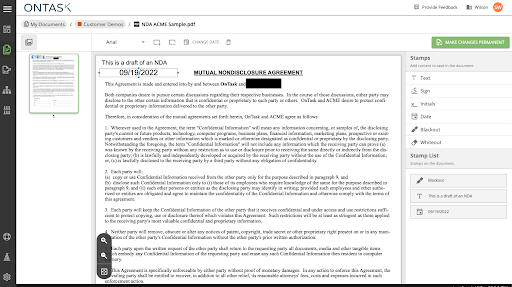
The “My Documents” section now supports document editing functionality. You have the ability to edit a document before or after the document has been sent through a workflow or quick sign with this latest update. Users can perform redactions by erasing text using the whiteout and blackout features that we’ve just added. Text can also be added to the document using text, signature, date, and initial stamps. The edited document can be saved as a template or completed document where it can then be downloaded or sent for signature via quick sign.
See the different stamp options that can be used on documents below:

Customer Issues Resolved
- Fixed issue where radios and dropdowns on web forms did not properly generate a prefilled value if the value was not explicitly set different from the label.
- Fixed issue where the sample CSV generated for bulk launch did not have proper test values for fields with options.
- Fixed issue where certain files with small page dimensions were not properly showing fields during signing.
- Toggling workflow template timers will now properly allow the template to be published.